Understanding Web Services and REST
1. WEB SERVICE - W3C DEFINITION
Software system designed to support interoperatble machine-to-machine interaction over a network.
2. 3 KEYS
- Designed for machine-to-machine (or application-to-application) interaction
- Should be interoperable - Not platform dependent
- Should allow communication over a network
3. How does data exchange between applications take place?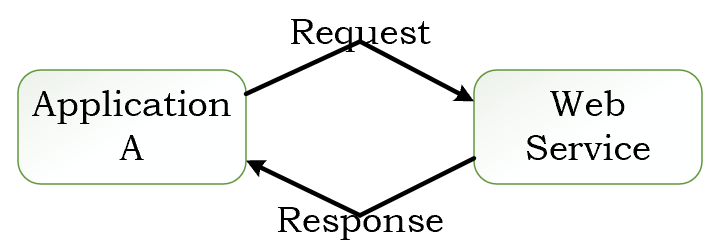
The input to a web service is called a Request and the output from a web service is called a Response. Request and Response are the basic concepts behind web service.
4. How can we make web service platform independent?
- The key point is the Request and Response should also be platform independent. They should be in formats which are supported by all different kinds of platforms.
- There are two popular formats for Request and Response. One is XML, i.e. Extensible Markup Language. Another is JSON, standing for javascript object notation.
5. How does the Application A know the format of Request and Response?
The solution is Service Definition.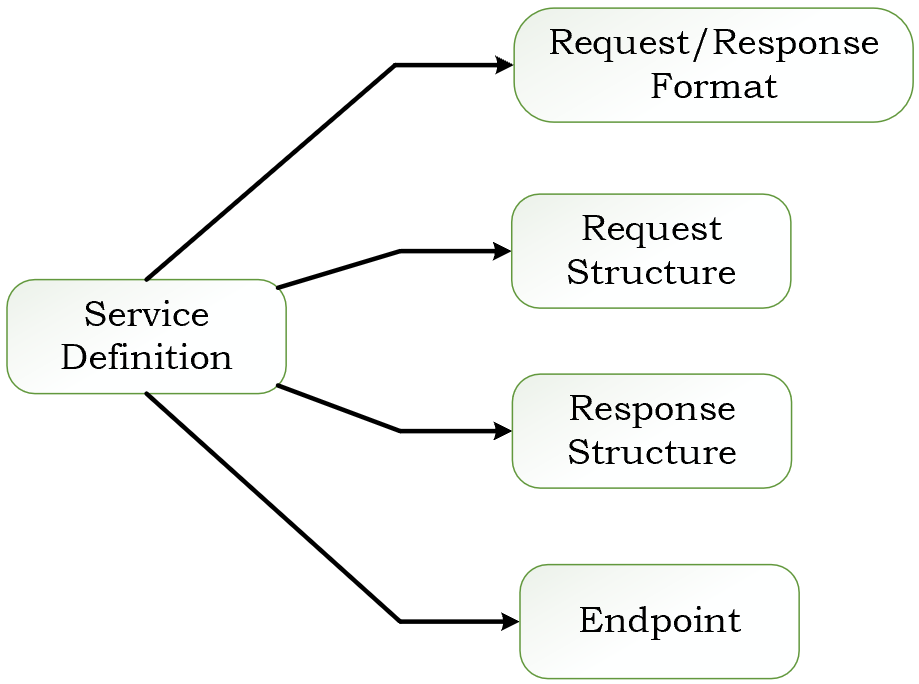
End point defines where the web service is available, say what URL is the service is exposed at.
6. Key Terminologies
- Request and Response:Request is the input of our service and response is the output from a web service. Message exchange format is the format of the request and response.
- Service Provider or Server: The web service shown in the above figure is called a service provider. Service provider is the one which hosts the web service.
- Service Consumer or Client: The service consumer is the one which is consuming the web service.
- Service Definition: The Service definition is the contract between the service provider and the service consumers.
- Transport (HTTP and MQ): Transport defines how a service is called. Is the service exposed over Internet. Or is the service exposed over a Queue. Two popular formats are HTTP and MQ. HTTP is basically over the web. Just like you type a URL in the browser, in a similar way application A would call the web service. The other format is MQ is to use communication over the queue. The service requester would place a message in the queue. The service provider would be listening on the queue. And as soon as there is a request on teh queue it would take the request, do the processing of it, create the response and put it back in the queue and the service requester would get the response from the queue. The transport which is used is MQ.
7. RESTful Service
The key thing about REST services is the fact that they would want to make best use of HTTP protocol.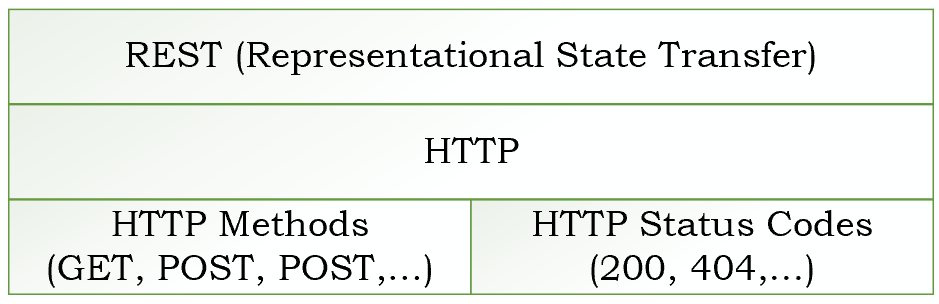
7.1 What is HTTP?
What happens is when I enter a URL in the browser, a request is being sent to the web server. And the website server responds back with a response.
What is the format of this request and response? These requests and responses are in a format which is defined by HTTP, i.e. Hypertext Transfer Protocol. For example,
- When I type in a URL in the browser. It sends a GET request to the Server. Server response back with a HTTP response containing the HTML. The browser looks at that response, takes the HTML and displays it on the screen.
- Another example say there is a form I’m filling up with a list of details and I click the submit button. In those kind of scenarious, typically, we are creating a a POST request. The HTTP defines the headers which are present in the request and the body of the request. Also in the response there are headers and also the body.
In addtion to the request header and request body, HTTP also defines something called request Methods. You can indicate what action you are doing by using the HTTP request methods.
- GET: I am trying to get the details of something.
- POST: I am trying to create something.
- PUT: I am trying to update something.
HTTP response on the other hand will also include a HTTP response status code.Was it successful? Page not found? 404 and thinks like that.
7.2 RESTful Web Services
RESTful web services try to define services using the different concepts that are already present in HTTP.
KEY ABSTRACTION - RESOURCE
The resource is that you would want to expose to the outside world through your application. In this todo list app, users, todos, … are all resources.
A resource has an URI (Uniform Resource Identifier), such as
- /user/Teemo/todos/1
- /user/Teemo/todos
- /user/Teemo
A resource can have different representations, such as
- XML, HTML, JSON
REST does not worry about how you are representing your resource. Is it HTML, is it JSON? That does not really matter.The most important thing is the fact that you define your resource and perform the actions on the resource using whatever facilities that are provided by HTTP.For example,
- Create a User - POST/users
- Delete a User - DELETE/users/1
- Get all Users - GET/users
- Get one user - GET/users/1
The important thing about REST is that fact you have to think in terms of the resources. What are the different resources that are present in your appliation that you would want to expose to other applications.And the second thing is make use of the HTTP.If you want to do any operations on the resource you have to use the verbs which are already specified by HTTP. GET, PUT, POST, FETCH…Transport is always HTTP. REST is completely build on top of HTTP.
There is no standard service definition which is attached with REST. That can be a drawback because when a client wants to consume a service it needs to understand the request format and response format. So the web service definition will be really useful. WADL, i.e. web application definition language is one of the formats in which you can specify your RESTful Web services. Or Swagger which is more popular.
next step